Salesforce upgrade

Salesforce upgrade the Work.com platform

The recent Salesforce upgrade has new tools that help workers stay productive from anywhere while also enabling safer in-person experiences. Salesforce has released a number of upgrades to its Work.com platform in an effort to help organizations grow. This will help businesses while returning to the office safely.

Work.com is already being used by cities and companies around the world. Your team will be safe with technology for employee wellness, shift, management manual contact tracing and more. In fact, Salesforce recently announced Work.com for Vaccines to help orchestrate the “largest vaccination campaign in human history”. Governments and healthcare organizations are still preparing to distribute a Covid-19 vaccine, once found.

TechRadar take a closer look at the best CRM software of 2020: Customer relationship management solutions. TechRadar have also compiled some other articles that will help businesses

Salesforce upgrade

Salesforce announced multiple updates to its Work.com solution this week designed to
help companies adjust to the new normal (Image credit: Salesforce)

Employee Workspace is a central digital hub where employees can access the tools and resources, they need to work remotely including productivity apps like Google Workspace, learning platforms such as myTrailhead, payroll systems and more. The workspace also provides personalized communications, embedded collaboration apps and notifications.

Salesforce’s new Employee Helpdesk uses Einstein AI-powered chatbots to provide employees with quick and easy access to knowledge articles and escalation paths across any department. Employees can even use the helpdesk to ask questions about IT support or HR policies and benefits.

Safer in-person experiences with the Salesforce upgrade

While Twitter and other companies have said that they will allow their employees to work from home indefinitely, other organizations are now preparing to return to the office which is why Salesforce has added new communication apps to Work.com to enable safer in-person experiences for both customers and employees.

Brick and mortar businesses can use the company’s Queue Management software to minimize physical lines by creating virtual queues to protect customers and manage onsite capacity. Using the service, customers can easily reserve their place in line from anywhere and get updated on queue status via SMS to avoid having to wait outside for long periods of time.

Communicating updated hours of operation, new appointment times and safety reminders can be done using Saleforce’s Broadcast Messaging. Organizations can use the service to communicate with their employees and customers. They can use their preferred channels such as text, WhatsApp or Facebook Messenger. Businesses can also use Broadcast Messaging to manage follow-up questions or service requests with automated chatbots and personalized service communications.

Finally, Digital Trust Cards allow local store employees to quickly update websites and apps with safety protocols specific to their location. Such as social distancing guidelines and cleaning policies to help build customer trust and confidence that they will be safe when vising in-person businesses.

EVP and GM of Platform, Trailhead and AppExchange at Salesforce, Sarah Franklin explained in a press release how the company’s latest upgrade to Work.com will help businesses thrive in the new normal, saying:

“The pandemic has accelerated everything, and every company is re-imagining work in the new all-digital world. The  new technology helps employees be productive anywhere. It will create a safe in-person experiences for customers, Work.com is helping companies get back to growth and thrive in the new normal.”

The IT doctor will see you know

With so many choices available for a CRM system, which is the right one for your business? We invest time going down the gym, eating the right food and trying to stay healthy. However, how healthy is you IT system?

Winter is on its way; some people are having their flu jab. Contact the LIS Help Desk to book your IT audit. We will make sure you have the right security in place to stay healthy. Upgrade your software to stay efficient and prescribe any other long-term treatment to make sure your business stays fit.

LIS – SECURING YOUR DIGITAL WORLD

#Salesforce #CRM #Business #ITsupport


Museum losing millions

Facebook donates £1 million to help save a museum losing millions

Facebook is donating £1 million to Bletchley Park. The UK centre for Allied code breaking during World War II that now operates as a museum. This museum is losing millions of pounds during the pandemic. Rory Cellen-Jones the BBC’s Technology Correspondent takes closer look into this generous donation.

Leaders of the UK’s cultural sector warned the industry is facing possible devastation. A potential loss of more than 400,000 jobs and up to £74 billion in revenue to the end of 2020. This is due to the COVID-19 pandemic. According to new research from Oxford Economics commissioned by Creative Industries Federation. The research suggested museums are losing millions of revenue. As well as, theatres, galleries, will experience twice as much economic fallout from the pandemic as the overall economy. This also includes the industries of music, film, TV, Architecture and publishing.

Donation helps museum losing millions

The Bletchley Park Trust, a registered charity, announced in August that the site was facing a revenue shortfall of £2 million because of falling visitor numbers caused by the coronavirus. Because of the drop-in revenue (95% of annual income), the park announced it was considering 35 redundancies, constituting a third of its workforce. Facebook’s donation will save some of these jobs, but it’s not clear how many.

Museums lose millions

National Museum of Computing, Bletchley Park, Bletchley, Milton Keynes, UK

An ongoing legacy

Facebook said it made the donation in recognition of Bletchley Park’s “ongoing legacy as a birthplace of modern computing.” The park’s code breakers and mathematicians cracked the Enigma codes used by the Nazis. An achievement that some historians say shortened the length of the war by two to four years. They also made key theoretical and engineering breakthroughs. These include the creation of Colossus, the world’s first programmable digital computer. With the help of Alan Turing’s work, the English mathematician who is seen as the father of modern computer science and artificial intelligence. At its height, the code-breaking operation at Bletchley Park included some 10,000 employees, with women constituting roughly 75% of the workforce.

Bletchley Park Quote

 “The historic achievements of Alan Turing and the Bletchley team have benefited all of us greatly, including Facebook. We are thrilled to help preserve this spiritual home of modern computing,” said Steve Hatch, Facebook’s vice president of Northern Europe, in a press statement. The UK is Facebook’s biggest engineering hub outside the US, home to more than 3,000 employees, with more than half working in engineering roles.

In a press statement, Bletchley Park CEO Iain Standen said the site was “very grateful to Facebook” for its donation. “With this significant support, the Bletchley Park Trust will be better positioned to operate in the ‘new world’. It will keep its doors open for future generations,” said Standen.

Helping businesses in these troubled times

Museums are losing millions and all of the creative industries are experiencing difficult times. If ignored, thousands of world-leading creative businesses are set to close their doors, jobs will be lost and billions will be lost to our economy. The repercussions would have a devastating and irreversible effect on our country.

LIS client benefit from support for workers from home. Our team provide remote IT support and make sure your team have the correct access and security to enable them to work as if they were in the office. Contact the LIS Help Desk to find out how we can support your company.

LIS – SECURING YOUR DIGITAL WORLD

#technews #bletchleypark #funding #facebook

Digital Services Tax

Retail giant Amazon will NOT be impacted by £500m digital services tax. However the smaller retailers will be, HMRC admits. However, traders who use the site will be, the HMRC has revealed.

The Guardian claims the online retailer will only have to per a 2% charge on revenues it receives from third-party sellers trading on its marketplace. In June Rishi Sunak signed a letter alongside counterparts in France, Spain and Italy declaring that tech giants needed to ‘pay their fair share of tax’.

Seven months after the tax was announced, HMRC has revealed Amazon, paid £293million in taxes. On sales of £13.73 billion will not be affected by it.

Digital Services Tax

  • Two per cent on tax on internet giants will not impact Amazon, HMRC admits 
  • Treasury said Digital Services Tax would make companies pay ‘fair contribution’
  • Business leaders say the tax is penalising smaller companies who use Amazon  

With Amazon expected to cover the cost by charging higher fees. This results in putting it at an advantage compared to the businesses that use the website.

Should the Digital Services Tax be ditched?

In August it was reported that the Treasury was considering ditching the tax. Mr Sunak concluded that the £500million a year it is expected to raise is a pinprick compared with the hundreds of billions of pounds dent to the nation’s finances caused by the coronavirus epidemic.

Business groups have criticised the levy following this latest revelation. Lord Leigh of Hurley told the House of Lords: ‘It is clear that the UK government is not taxing Amazon properly. It is allowing it to avoid tax on its own sales through the marketplace’.

‘This puts regular retailers at a significant disadvantage. The digital sales tax does not achieve its objective of yielding more revenue from the likes of Amazon. However, it is simply passed on to its suppliers in the marketplace, which have to absorb this tax in their margin.’

Announcing it earlier this year, the Treasury described the levy as ‘a new 2% tax on the revenues of search engines. Including, social media services and online marketplaces which derive value from UK users’.

Businesses should make a fair contribution

The Government department hoped the measure would ‘ensure large multinational businesses in-scope make a fair contribution to supporting vital public services,’ it wrote in March.

The British Independent Retailers Association has voiced its own opposition. They warned the tax has penalised smaller retailers while giving Amazon the edge.

An Amazon spokesman said: ‘Like many others, we have encouraged the government to pursue a global agreement on the taxation of the digital economy at OECD-level rather than unilateral taxes. Rules would then be consistent across countries and clearer and fairer for businesses.’

IT does not have to be taxing

Who is likely to be affected? Large multi-national enterprises with revenue derived from the provision of a social media service, a search engine or an online marketplace to UK users. This is you if your website turns over more than £25 million in the UK! Hats off if you fall into this category. You are one of the few as the Government had some very specific targets in mind when devising this tax, introduced by the Government as of 1st April 2020.

Unfortunately, we are unable to help Amazon with their tax problems! However, LIS clients do benefit from our years of IT experience. Contact the LIS Help Desk to see how we can help your business. With an approach based on the socially distanced human touch, our knowledgeable team will help you achieve your business goals.

LIS – SECURING YOUR DIGITAL WORLD

#Digital #Tax #ITSupport #Business

Google Assistant Features

Google Assistant is a capable helper but adjusting these options will protect your privacy and put you in control. We have put together a short guide of five Google Assistant features you should turn off right now.

Business Insider take a look how to turn off or limit Google Assistant Features, if you don’t want it listening to you all of the time.

Make life easier with Google Assistant Features

You can use Google Assistant Features to set timers, call friends or restaurants for takeout and so much more. It’s certainly convenient to have Google around to answer quick questions. It will even report on the day’s weather or control your smart home. Still, there are some things you might want to disable on your Google smart speaker or smart display. After all, every feature of Google Assistant won’t be a good fit for everyone.

Whether you’re worried about privacy or just want a more natural conversation experience, here are five things to toggle off to get a simpler and safer Google Assistant experience.

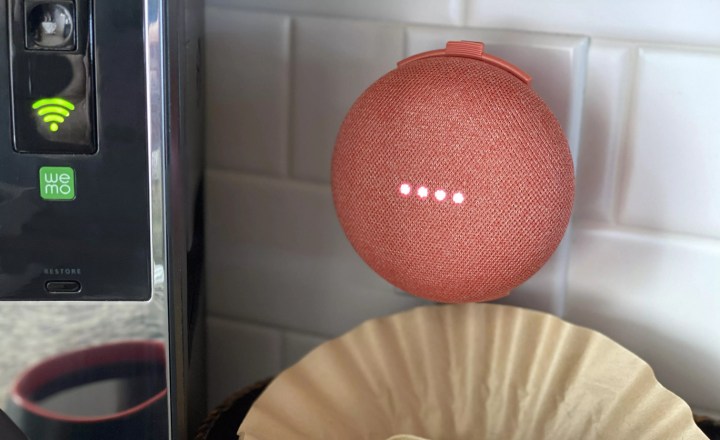
Google Assistant Features

One of Google Assistant’s most powerful features is its ability to act as the hub for your connected smart home of office.

Voice recording settings

Google recently announced changes to its voice recording privacy settings. Unless you opt in, Google won’t save your audio recordings or share them with its human analyzers to improve Google’s algorithms. However, if you opted in or have previously saved audio recordings, you can choose how long Google keeps them or manually delete them.

To adjust these settings, visit your Home app, tap on your profile picture in the top right, followed by Assistant Settings. There, you’ll land on the You tab. Select Your Data in the Assistant and scroll down to Audio Recordings. Tap to see options for saving, reviewing and deleting recordings.

Continued conversation

Continued Conversation helps Google listen for follow up questions without you having to say “Hey, Google” a second time. While this is handy, the extra listening can sometimes be less than seamless, especially when you don’t have a follow up question or you’re just asking a question of someone else in the room. Luckily, you can turn off this feature.

To turn off Continued Conversation in the Home app, tap on your profile picture in the top right, followed by Assistant Settings. In the next screen, navigate to the Assistant tab. There you’ll see several options including Continued Conversation. You’ll be able to toggle off Continued Conversation and see which speakers it will affect.

“Hey Google” sensitivity

If you feel like you’re always waking up your smart speakers accidentally, the “Hey Google” sensitivity may be too high. You can adjust how well your Google Assistant responds to its wake word if it isn’t hearing you well enough or if it mistakes other words for its wake word.

To adjust the sensitivity in the Home app, tap on your profile picture in the top right, followed by Assistant Settings. In the next screen, navigate to the Assistant tab and you’ll see several options including “Hey Google” sensitivity. There you’ll be able to adjust the sensitivity for each individual speaker in your home. Select the speaker you’d like to adjust and choose from five settings from “least sensitive” to “most sensitive.”

Ask Google

You can ask your Google Assistant for info and help with everyday tasks. Ask it questions and tell it to do things.
It’s always ready to help you get things done.

Camera settings

If you use a Google-enabled smart display like the Nest Hub Max, Lenovo Smart Display or JBL Link View, you may want to keep your camera disabled when you’re not making video calls. Each display does this a little differently. While JBL and Lenovo offer physical shutter options, you don’t get a built-in shutter with Google’s in-house display, the Nest Hub Max.

Instead, there’s a toggle button on the back of the display to disable the camera and microphone. An indicator light beside the camera lens shows the current status. This is a tough one, because you’ll need to remember to switch it on and off each time you use a camera feature. Still, having the option to make sure your camera is off when it needs to be is important.

Activity controls

Like voice recordings, Google saves information on the sites and apps you use with your Google account. If you’re concerned about privacy, adjusting these settings offers some peace of mind.

In the Home app, tap on your profile picture in the top right, followed by Assistant Settings. Tap the three dots on the top right of your screen and select Google activity controls. There, you’ll see a page with options for controlling which information Google gathers from your online and mobile app activity. You also can turn on auto-delete and choose how often your data is removed.

Whether you adjust one or all of these settings, personalizing your voice assistant can make the entire experience much more pleasant. If you live in a large household, features like Voice Match and Household Contacts can help everyone live in harmony with the same devices.

“Hey LIS”. How can you help me?

Technology is always changing; upgrades need to be managed and don’t forget about security issues. LIS customers benefit from our years if IT knowledge. We managed their IT systems to allow them to concentrate on their business. Consider us like you PC doctor or Virtual IT PA.

Contact the LIS Help Desk to discuss your options and found out how easy it is to keep your systems up to scratch.

LIS – SECURING YOUR DIGITAL WORLD

#GoogleAssistant #ITSupport #Upgrades #Security

Upgrade your software

How Excel may have caused loss of 16,000 Covid tests in England? Microsoft’s Excel spreadsheet software may have led to Public Health England misplacing nearly 16,000 Covid test results. Due to the fact that the software has a million-row limit.

The story published yesterday by the BBC written by Leo Kelion (Technology Desk Editor) investigates what went wrong. This highlights that if you upgrade your software and talk to your IT provider, you will avoid nasty surpises. Are you using out of date operating system and software? Upgrade your software to make sure your business operates more efficiently and stays secure.

The data error led to 15,841 positive tests being left off the official daily figures. In addition, 50,000 potentially infectious people may have been missed by contact tracers and were not told to self-isolate. PHE was responsible for collating the test results from public and private labs.

Rapid development of the testing programme has meant that much of the work is still done manually. Individual labs send PHE spreadsheets containing their results. However, the system has improved from the early days of the pandemic and it is still far from automated.

Upgrade your software

More than 50,000 potentially infectious people may have been missed by contact tracers after
15,841 positive tests were left off the daily figures. Photograph: Simon Leigh/Alamy

Excel spreadsheet error caused a huge spike in Covid cases

The weekly rate of new Covid-19 cases has soared in dozens of areas of England. Nearly 16,000 cases were left unreported because of a technical error with an Excel spreadsheet.

Manchester now has the highest rate in England, with 2,740 cases recorded in the seven days to 1st October. The equivalent of 495.6 cases per 100,000 people, up from 223.2 in the previous week.

The problem has led to a delay in efforts by NHS Test and Trace to find the contacts of those who tested positive for the virus, in some cases by around a week.

Prime Minister Boris Johnson was unable to say on Monday morning how many contacts of positive coronavirus cases had been missed.

IT experts ‘surprised’ at PHE use of Excel for Covid-19 data

IT experts have questioned why Public Health England used Excel for a scheme as large as NHS Test and Trace. Once the technical error led to nearly 16,000 cases going unreported. Computing experts and academics said it is “very surprising” that Excel was used for something of this scale and not adequately tested” they said.

“It is very surprising to hear that an enterprise scale system, presumably developed by professional technologists, is expected to run on Excel,” said Adam Leon Smith, fellow of BCS, The Chartered Institute for IT, and chair of BCS’s special interest group in software testing.

“Many large organisations refer disparagingly to Excel-based applications as ‘end-user driven architectures’. They spend lots of time trying to decommission them for reasons relating to security, control and stability”.

“This is mostly because Excel is designed for end-users not complex systems. It has well-known scalability limits. Excel can’t handle unexpected situations in a way that interacting systems will be able to recognise”.

“It sounds like these limitations have manifested in real problems in this case. This is exactly why databases are normally used in enterprise applications”.

“Even if presented with a system that did rely on Excel, one of the first things that should have been identified through a testing process was a limit to the data volume it could process.”

Covid Testing

A sign in Bolton, UK reminds people of the need for testing Credit: Adam Vaughan/Shutterstock

Excel has limitations

Dr Peter Bannister, executive chair for the Institution of Engineering and Technology Healthcare Sector, said limitations of commercial off-the-shelf products such as Excel for medical uses are well-known.

“It’s disappointing to read that a lack of awareness around the limitations of a consumer software product has led to such a negative impact for all those who are relying on the Covid testing programme,” he said.

“It’s widely known within medical device development that the use of commercial off-the-shelf products, such as Excel, requires additional testing to ensure that they are able to meet the stringent requirements of use in a healthcare setting.”

The Excel spreadsheet reached its maximum file size. New names could not be added in an automated process, he advised. The files have now been split into smaller multiple files to prevent the issue happening again.

Consider file size

Jon Crowcroft, Marconi Professor of communications systems from the University of Cambridge, said file size is a “basic consideration”.

“One would think that a software engineer would have considered a worst-case test scenario for any system design – on paper before you even get to writing code – just to make sure it wouldn’t blow up in any way like this,” he explained.

“The limitations of Excel in terms of big data, which is generally a very decent piece of software, are well-known – if you look at how many people are expressing astonishment at this online, you can see that.”

He continued: “There are many big systems in Government (e.g. DVLA’s or HMRC’s) that work at this scale so there’s no excuse.

“Also, a simple sanity check on the data or error checks in the system might have told them when they hit this limit instead of discovering it after the event.

“This sort of thing is standard in sixth form or undergraduate computer science training too.”

Upgrade your software for efficient business

Has your organization been considering an upgrade to Microsoft Office 365 from on premises Office/Exchange? Perhaps you’re holding back because the word, “upgrade” is enough to scare anyone away. Most companies upgrade software when they are forced to. But in the case of Office 365, the benefits you’ll get from upgrading are delightfully easy and without doubt worth the commitment.

Contact the LIS Help Desk about how we can upgrade your software to Office 365. Take advantage of tools like Intelligent Edge, PowerApps and Flow. These tools ensure  your data is tied to the same cloud system. This enables you to access your email addresses without additional setup and configuration, as well as other benefits.

Office 365 Security Package
Our Office 365 Security Package is a bundle of software tools. The package works continuously on Microsoft Office 365 accounts. They provide genuine protection benefits that EVERY business ought to have. We manage EVERYTHING for you. It’s all in our hands, which is exactly how it should be. However, once we upgrade your software, you will have peace of mind to allow you to focus on your business.

Download our Office 365. A Risky Business? booklet to find our more.

LIS – SECURING YOUR DIGITAL WORLD

#Excel #Covid #Office 365 #ITSupportEssex